Just a really quick blog update this time. (Yes, I've said that before, but this time I mean it...)
I have made a short video demo of EasyMatrix at it's final Alpha stage. It's pretty much finished apart from a front-end which I am working on now.
Before you watch the video, I need to explain a couple of things. Firstly, I used some free software to grab this video, and the colour rendering isn't brilliant, so towards the end - at the bit where I flood-fill the matrix with "grass" - the colour looks really weird. The program renders it perfectly, it's the video grabber that is distorting it. Also, the mouse pointer is visible throughout the video. It isn't there when you are actually using the software.
So that's it. Enjoy the video and I'll see you soon. Next stop planet Beta!
Friday, 1 July 2011

Thursday, 23 June 2011
Quickly approaching the beta stage...
EasyMatrix is getting to the point now where it's almost at beta. I have tons of ideas that I'd like to implement, but I am hesitant because (a) The whole point is to keep it simple to use and (b) originally I only wrote this as a tool to help myself create levels for my AI experiments, and it can already do that!

Since my last blog update, lots of cool stuff has happened...


Since my last blog update, lots of cool stuff has happened...

- I have now written the texturing routine, which includes a "Texture Paint" function
- After a suggestion via the DarkBasic Forums, I have changed the node indicators from spheres to cubes
- I can now Export a matrix design, and Import it again, complete with textures
- I have implemented "AutoSave" which intelligently saves the design if any changes are made
- I have moved away from an imported 3D object for the selector rod, replacing it with an internally rendered model.
- The user can now toggle the "help panel" on or off
- A few internal routines have been completely rewritten for extra efficiency
- The code is now fully "Remmed Up", more concisely than I ever have in the past

There are a couple of things that I'm still looking at...
- A "Flood Fill" function which covers all the tiles with the selected texture
- A "Node/Tile Drag" function when you drag the selection up/down rather than click to raise/lower
- "Auto Texture by Height" which automatically textures a tile depending on its height (experimental)
- "Lamp Posts" which allows the user to place a number of light sources
So it's getting there. I can throw together a perfectly usable level in about 5 minutes which, if coded without using EasyMatrix would take me the best part of a day (including texturing). That's pretty efficient in my book.
Of course I still need to code for the user-selectable bits such as Matrix dimensions, number of tiles, minimum and maximum node heights etc.., but I have pseudo-routines already in place that just need a graphical front end writing.
Of course I still need to code for the user-selectable bits such as Matrix dimensions, number of tiles, minimum and maximum node heights etc.., but I have pseudo-routines already in place that just need a graphical front end writing.
One thing I will have to look at is the texture pack. The one I'm using is just cobbled up from stock PaintShop Pro textures and colours, and I really am hopeless at graphics. But the idea is that the end user can replace the standard texture pack with one of their own design anyway. Maybe in a later release there will be a couple to choose from. Now if I could only talk someone into throwing some packs together for me..

I just made this level to show the editor in action (it took about 3 minutes), imagine that with a higher resolution (more matrix tiles), better textures, some light sources dotted about etc.. and you get the idea of what I'm trying to ultimately achieve here.
The alpha version used while writing this post can be downloaded FROM HERE.
The alpha version used while writing this post can be downloaded FROM HERE.
My biggest "problem" at the moment is that I've fallen in love with Call of Duty 4 all over again...
Saturday, 11 June 2011
A near-usable tool!
I got some really productive coding sessions in over the last few nights. Yes, there were the usual bouts of frustration mixed with raw expletives and sprinkled with a topping of "wtf?", but on the whole, I got loads done.
First up, the viewpoint movement routine. I tried various methods of achieving this, but it turned out that the most effective was one of the simplest. Move the selector rod to a tile, hit "C", and the camera then centres on that tile. Simples. I had to code an assist routine, because when the camera makes the jump, if the tiles aren't yet textured (and they're not because I haven't wrote a texturing routine yet) it's easy to become disorientated and lose track of which tile you centred on. To aid here, I have made a translucent cube appear on the centred tile, and slowly sink down through the matrix. This instantly shows which tile the camera was focused on...


First up, the viewpoint movement routine. I tried various methods of achieving this, but it turned out that the most effective was one of the simplest. Move the selector rod to a tile, hit "C", and the camera then centres on that tile. Simples. I had to code an assist routine, because when the camera makes the jump, if the tiles aren't yet textured (and they're not because I haven't wrote a texturing routine yet) it's easy to become disorientated and lose track of which tile you centred on. To aid here, I have made a translucent cube appear on the centred tile, and slowly sink down through the matrix. This instantly shows which tile the camera was focused on...

Next up, the Save and Load routines. Admittedly, these do need more work, but the basics are there and I can actually export matrix data, then re-import it. Sort of. What you have to remember is that there is no "Save Matrix" command available. (Or "Load Matrix" for that matter). Both of these routines have had to be built from scratch, and I've probably gone right around the houses to get them where they are, but it's a learning curve.
So on to the issues. Firstly, the Save isn't 100% reliable. That's not a great start. I'm still trying to nail the problem down, but when it does save - which is 9 times out of 10 - it actually saves data. It's just that now and then it completely refuses to export anything at all, and I'm not sure why yet. By the way, these Load/Save tools aren't like your standard Windows dialogue boxes or anything fancy like that, they are pretty much "Press S to save then type in a filename" or "Press L to load then type in a filename" affairs, but I'm a beginner at this so I have to start at the beginning. Or something.
Anyway, on to the Load routine. Yes, it loads the data I saved earlier. Unfortunately, it doesn't pick up on any texture data, and I can't work out why - yet. So I get the Matrix shape loaded, but it's completely wireframe. I know I haven't wrote a texturing routine yet, but all the tiles are textured by default, and it's not picking those values up for some reason. But I'll get there.
So the following pictures show what is currently happening when you export a matrix, then shut down the program, then open it again and import that saved matrix. As you can see, the correct shape is there but that's all. Having said that, getting this far was no walk in the park.


Finally, I've started work on the texturing routine. This is a standalone program at the moment because I want to figure it all out before I embed it into EasyMatrix. Basically, the program takes a bitmap which contains all the textures needed for the level, cuts it up into 48 small pictures, makes 48 sprites from these pictures and lets you manually select which one you want to work with. The "active sprite" as I call it, is shown at the top of the swatch as a full-size (128 x 128) texture tile, ready for application to the Matrix. But I haven't got that far yet.

As you can see, the mini-swatch rotates slightly, to give you a quick indication of where abouts in the texture pallet you are.
So that's about it so far, it's a near-usable tool but not quite there. I would say another couple of weeks if gaming doesn't get in the way. Which reminds me, I re-installed Call of Duty 4 and completed it again this last week. I forgot how much better than Modern Warfare 2 it is. Now I'm getting hooked on the Multiplayer again. So I managed to do that, and get a fair bit done on EasyMatrix. It's been a good week, coding-wise.
Sunday, 5 June 2011
Off on a tangent...again!
Anyone who has been following this blog will know that I tend to shoot off at random directions when it comes to coding stuff. I'm weak like that, too easily distracted.
Once again, while researching and writing test routines for my AI experiments, I got a bit fed up of working with a flat floor. My newly acquired model objects demanded some more interesting scenery to interact with. So I decided to bang together a quick program which created a randomly generated "matrix" of tiles. But the problem was that they literally were too random. Yes I could apply various restraints etc, but I wanted something that would reflect a realistic game level.
So again I "went off on one" and started a new project. This one is a level editor of sorts, based on a matrix system. This will actually be a useful tool I think, because not only can I use it to make test levels for the forthcoming AI routines, it can (or rather will) be used to make actual game levels once I learn how to code AI.
I was also partly inspired by the "MouseCam" routine mentioned in my previous post. This proved to be very handy in my "EasyMatrix" program, essential in fact. Also, you might remember at the end of my last post, I talked about working out a routine that would convert the mouse input for use in a 3D environment. Well, I nailed that one too! (An achievement I am pretty happy with, if I'm honest.)
So now I can control the camera in 3D space and I can use the mouse to point to any object or area within that space. I just know these routines are going to be useful to me one day, and they are already deeply embedded in my EasyMatrix project.



Once again, while researching and writing test routines for my AI experiments, I got a bit fed up of working with a flat floor. My newly acquired model objects demanded some more interesting scenery to interact with. So I decided to bang together a quick program which created a randomly generated "matrix" of tiles. But the problem was that they literally were too random. Yes I could apply various restraints etc, but I wanted something that would reflect a realistic game level.
So again I "went off on one" and started a new project. This one is a level editor of sorts, based on a matrix system. This will actually be a useful tool I think, because not only can I use it to make test levels for the forthcoming AI routines, it can (or rather will) be used to make actual game levels once I learn how to code AI.
I was also partly inspired by the "MouseCam" routine mentioned in my previous post. This proved to be very handy in my "EasyMatrix" program, essential in fact. Also, you might remember at the end of my last post, I talked about working out a routine that would convert the mouse input for use in a 3D environment. Well, I nailed that one too! (An achievement I am pretty happy with, if I'm honest.)
So now I can control the camera in 3D space and I can use the mouse to point to any object or area within that space. I just know these routines are going to be useful to me one day, and they are already deeply embedded in my EasyMatrix project.

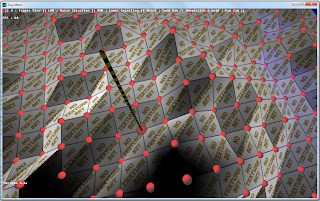
That picture shows the concept of EasyMatrix - a tile based editor, with 4 editable node points per tile, and a 3D viewing angle. This image was kindly rendered by my friend (and 3D/game design artist) Tom Joyce.
The development of EasyMatrix has flown along so quickly over the last week that I haven't really taken many screenshots. I must throw a shout out to another friend (and mathematical genius) Ragnar Karlsson, who helped me out with a particularly tricky algorithm. I never was any good at trigonometry.
Anyway, this is what EasyMatrix looks like right now...


That bottom picture shows the same viewing angle, but the left one is in "edit" mode while the right one is in "real world" mode. It will look a lot better when I implement the textures. It is still possible to edit the matrix in "real world" mode, but you have to be pretty accurate with the pointer, because the helper objects (red dots) are turned off.
So next I need to implement a way to move the point of view (at the moment you can pan around but the camera always points to the dead centre of the matrix), and I need to look into texturing the tiles, and I also better figure out a way to actually save or export the matrix otherwise this whole thing will be pretty pointless.
If you want to have a play with an early version of this, you can download the file by CLICKING HERE. It's a .rar file so you will need to unrar (unpack it) prior to use.
There are only a couple of requirements...
- You must have at least DirectX 9.0c installed. But you already will if you're a gamer, right? (Get DX9 here)
- Your mouse must have a clickable wheel. The camera pan only works when you hold the wheel button down.
That's pretty much it really. It will still work if you don't have a clickable mousewheel, but your view will be very VERY restricted.
Now, I should make a start on that viewpoint movement routine. I think there is some Magners in the fridge...
Monday, 30 May 2011
New ideas..
Well Tank has only been on ice a few days and I'm already itching to learn new stuff. One of the major issues I faced when writing Tank was the choice between single player and multiplayer. As it happens, in that instance multiplayer won out.
Now I feel an overwhelming urge to learn about Artificial Intelligence (AI) and how it can be used in a single player game scenario. After researching for only an hour, I am coming to realise that this is a huge, complex subject, and even the simplest AI routines are going to take some serious thinking about.
Before I can even start playing with AI, I need to create a platform upon which to graphically display the results of the routines. Looking at a list of numbers never excited me like watching something moving around on screen. So I wrote a small program that displays a flat floor and a 3D object, and lets the user move the camera around by using the mouse. The camera remains pointing at the 3D object, and stays a set distance from it, but this distance can be altered by using the mouse scroll wheel, a kind of zoom in/out setup. It's pretty rudimentary, but eventually it will have variables that define mouse sensitivity, zoom speed, etc... It already has minimum and maximum zoom levels, and ceiling and floor limits.

A while back, I was talking to a friend about AI routines and single player game design in general, and it turns out that he studied game design as part of his university degree. Not so much the coding side, but the overall game design itself. So I brought the subject up again last night, and managed to blag some of his basic 3D models to play around with. I find that having "characters" to play with rather than just basic cubes gives a little more incentive and inspiration when working.

So I'm working with Tom "Cypher" Joyce at the moment on this project, with him providing models and ideas while I'm trying to implement that into code. Tom is using Maya to build the models then exporting them to Google Sketchup then sending me the file. I am then resizing and reorientating them to suit the game world and exporting from Sketchup into a DirectX format that can be imported directly into DBPro. Right now there is a "soldier" on the map who can't move, turn, die, can't do anything really. But I can use the mouse to move the camera around him.

He looks a bit dull and uninteresting sat there, but there is no lighting applied yet, and that makes all the difference. I have some ideas about the AI routines, but I am already approaching a massive challenge, and that is how to work out the position of the mouse pointer with relation to the world floor. That sounds ridiculous really but let me explain; if the world was going to be completely flat then there wouldn't be an issue at all. A simple call to "mousex" and "mousey" would return the position of the mouse pointer. But I don't intend to keep the floor flat for long, this isn't Tank. When the floor really is 3D and has raised and lowered areas then it is going to be a LOT harder to work out where the mouse is pointing, all because of that extra dimension. To put it another way, look at your mouse now. You can move it left and right (x axis) you can move it forwards and backwards (y axis), you can move it diagonally (combination of x and y axes) but imagine if you could lift the mouse up off the desk. I need to work out the position of it there (albeit virtually) and do it in real time.
So before I even start to think about AI routines, the next wall is already in front of me - how to use a 2D input device to provide accurate input to a 3D application?
The next few days could be interesting...
Now I feel an overwhelming urge to learn about Artificial Intelligence (AI) and how it can be used in a single player game scenario. After researching for only an hour, I am coming to realise that this is a huge, complex subject, and even the simplest AI routines are going to take some serious thinking about.
Before I can even start playing with AI, I need to create a platform upon which to graphically display the results of the routines. Looking at a list of numbers never excited me like watching something moving around on screen. So I wrote a small program that displays a flat floor and a 3D object, and lets the user move the camera around by using the mouse. The camera remains pointing at the 3D object, and stays a set distance from it, but this distance can be altered by using the mouse scroll wheel, a kind of zoom in/out setup. It's pretty rudimentary, but eventually it will have variables that define mouse sensitivity, zoom speed, etc... It already has minimum and maximum zoom levels, and ceiling and floor limits.

A while back, I was talking to a friend about AI routines and single player game design in general, and it turns out that he studied game design as part of his university degree. Not so much the coding side, but the overall game design itself. So I brought the subject up again last night, and managed to blag some of his basic 3D models to play around with. I find that having "characters" to play with rather than just basic cubes gives a little more incentive and inspiration when working.

So I'm working with Tom "Cypher" Joyce at the moment on this project, with him providing models and ideas while I'm trying to implement that into code. Tom is using Maya to build the models then exporting them to Google Sketchup then sending me the file. I am then resizing and reorientating them to suit the game world and exporting from Sketchup into a DirectX format that can be imported directly into DBPro. Right now there is a "soldier" on the map who can't move, turn, die, can't do anything really. But I can use the mouse to move the camera around him.

He looks a bit dull and uninteresting sat there, but there is no lighting applied yet, and that makes all the difference. I have some ideas about the AI routines, but I am already approaching a massive challenge, and that is how to work out the position of the mouse pointer with relation to the world floor. That sounds ridiculous really but let me explain; if the world was going to be completely flat then there wouldn't be an issue at all. A simple call to "mousex" and "mousey" would return the position of the mouse pointer. But I don't intend to keep the floor flat for long, this isn't Tank. When the floor really is 3D and has raised and lowered areas then it is going to be a LOT harder to work out where the mouse is pointing, all because of that extra dimension. To put it another way, look at your mouse now. You can move it left and right (x axis) you can move it forwards and backwards (y axis), you can move it diagonally (combination of x and y axes) but imagine if you could lift the mouse up off the desk. I need to work out the position of it there (albeit virtually) and do it in real time.
So before I even start to think about AI routines, the next wall is already in front of me - how to use a 2D input device to provide accurate input to a 3D application?
The next few days could be interesting...
Thursday, 26 May 2011
Project on ice...
Well I knew this point would come, but I didn't think it would be so soon. Tank has evolved from a solid block simulation to a playable multiplayer game within a matter of months. It's my first pet project, and it will still be semi-active, but for now, I am putting Tank on ice.
I've decided to take a break from development of this particular game. I am itching to try new stuff. I want to learn about AI, bitmap-based text, new effects. There are so many elements involved in the creation process that I am starting to feel a little bogged down. The whole idea of me doing this was to get away from the feeling of stagnation, and up to this point I believe I've achieved that. From the joyous realisation of working out a routine, to the hair-pulling frustration of near punching the monitor, I've been through some extremes with this game. I think it's been a great project to get me back into coding, and I've learned a lot. Skills, I hope, which I can use in other, more original projects. I have plenty of ideas swimming around in my head.
I know it's bad practice to leave a thing like this unfinished, and I really do intend to come back to this at some point (unless someone wants to adopt it and continue development), but for now I have a real need to move on. Useful lessons have been learnt over the last couple of months, but so many corners remain unturned. I feel that now is the time to venture out and look around those corners.
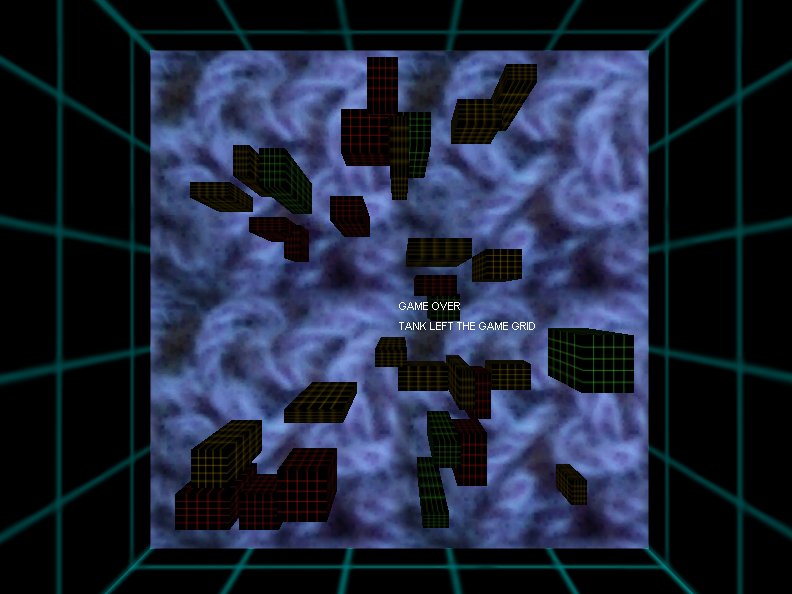
I'll be blogging about it here again when I get something going, but for now I'll sign off with a few screenshots of Tank (Click the images for larger versions). The game made it to version 0.9a, nearly v1.0, but not quite. Fully playable, but in need of some bolt ons. I did what I set out to do. I created a game.


I've decided to take a break from development of this particular game. I am itching to try new stuff. I want to learn about AI, bitmap-based text, new effects. There are so many elements involved in the creation process that I am starting to feel a little bogged down. The whole idea of me doing this was to get away from the feeling of stagnation, and up to this point I believe I've achieved that. From the joyous realisation of working out a routine, to the hair-pulling frustration of near punching the monitor, I've been through some extremes with this game. I think it's been a great project to get me back into coding, and I've learned a lot. Skills, I hope, which I can use in other, more original projects. I have plenty of ideas swimming around in my head.
I know it's bad practice to leave a thing like this unfinished, and I really do intend to come back to this at some point (unless someone wants to adopt it and continue development), but for now I have a real need to move on. Useful lessons have been learnt over the last couple of months, but so many corners remain unturned. I feel that now is the time to venture out and look around those corners.
I'll be blogging about it here again when I get something going, but for now I'll sign off with a few screenshots of Tank (Click the images for larger versions). The game made it to version 0.9a, nearly v1.0, but not quite. Fully playable, but in need of some bolt ons. I did what I set out to do. I created a game.
Hunting for enemies...

A near miss...

Shockwave...

Game Over!!
Multiplayer home-made server..

To be continued....
Sunday, 22 May 2011
Who said explosions have to be Red and Yellow ?
Just a quick update this time, and I promise to keep it short.
I have been working on the shockwave/explosion routine of Tank in order to get rid of the side-effects presented when using Sprites for my explosions. I'm getting somewhere near now, so I thought I'd upload a short video of how it's currently looking. I do intend to make the shockwave a little less opaque, but it's still an early version of the routine.
The video shows a stationary enemy tank which already has depleted health - no one shot kills here. I fire at the tank but intentionally aim low, just to show the effect of the shockwave on that tank. If you look carefully, you will see my projectile falls far short of the enemy, yet the wave still takes him out. The shockwave is actually expanding while it exists, but due to the low frame rate of the video capturing software it's not that easy to notice.
I have been working on the shockwave/explosion routine of Tank in order to get rid of the side-effects presented when using Sprites for my explosions. I'm getting somewhere near now, so I thought I'd upload a short video of how it's currently looking. I do intend to make the shockwave a little less opaque, but it's still an early version of the routine.
The video shows a stationary enemy tank which already has depleted health - no one shot kills here. I fire at the tank but intentionally aim low, just to show the effect of the shockwave on that tank. If you look carefully, you will see my projectile falls far short of the enemy, yet the wave still takes him out. The shockwave is actually expanding while it exists, but due to the low frame rate of the video capturing software it's not that easy to notice.
As you can see, I decided to go for a "non-standard" colour for the explosion particles. I did this primarily for two reasons; Firstly, it stands out more when there is a distant battle occurring, and Secondly, I can do whatever the hell I like in the world of Tank :)
So that's it for now, other than a quick thank you to Nick Baumer for helping me see the light when coding the shockwave routine. I'm still not decided on an enemy locator function yet...
Subscribe to:
Posts (Atom)